

Description
Download 007 GoldenEye – Fast Secure Search Browser Tool
Overview
007 GoldenEye is a lightweight, trial‑version search browser designed for legacy Windows systems. First released in 2011, the software still appeals to users who need a fast, secure online search experience on older machines such as Windows 95 and its predecessors. The current version 2.0 was last updated on May 30 2011, and despite its age it has amassed over 100,000 downloads worldwide, with strong interest in the United States, Australia, and Azerbaijan. 007 GoldenEye positions itself as a “fastest and most efficient online search” tool, offering a streamlined interface that reduces the memory footprint compared with modern browsers. Because it belongs to the Browsers → Search subcategory, it focuses primarily on delivering quick query results rather than full‑scale web rendering, making it ideal for users who only need to look up information without the bloat of today’s heavyweight browsers. The program is distributed in English, runs without a hefty installation size, and can be downloaded for free from reputable software directories. Its trial nature means users can evaluate core features before deciding whether to purchase a full license, a model that aligns well with budget‑conscious individuals and small businesses still operating legacy hardware.
Key Features, Compatibility & Performance
Feature Highlights
- Lightning‑fast query processing with minimal latency.
- Low memory usage – runs comfortably on machines with as little as 64 MB RAM.
- Integrated safe‑search filter to block explicit content.
- Customizable search engine shortcuts (Google, Bing, DuckDuckGo, etc.).
- Portable mode – run directly from a USB stick without installation.
- Automatic update checker (last update check in 2011).
- Simple, uncluttered UI designed for Windows 95/98/ME.
Compatibility
007 GoldenEye is officially compatible with Windows 95, Windows 98, Windows ME, and earlier Windows versions. The installer checks for the presence of core system files (such as USER32.DLL) and will refuse to run on newer operating systems unless launched in compatibility mode. This focus on legacy platforms ensures that the software remains stable on older hardware, but it also means that modern Windows 10/11 users may encounter issues unless they use a virtual machine or compatibility shim.
Performance Insights
Because the application is built on a stripped‑down engine, it bypasses many of the rendering layers found in contemporary browsers. Users typically report page load times up to 30 % faster for simple search queries, especially when network latency is the dominant factor. The program also employs a local cache that stores the most recent 50 search results, allowing instant recall of previously visited pages. However, the trade‑off is limited support for HTML5, CSS3, and JavaScript, meaning complex web apps (e.g., modern email clients or streaming services) will not render correctly. For its intended purpose—quick text‑based searches—007 GoldenEye delivers a responsive experience that feels native to the era of its creation.
Installation Guide and Everyday Usage
Step‑by‑Step Installation
- Download the installer file from the official distribution page. The file is typically named
GoldenEye_Setup_v2.0.exeand is less than 5 MB in size. - Right‑click the installer and select “Run as administrator” to ensure the program can write to the
Program Filesdirectory. - Follow the on‑screen wizard: accept the EULA, choose the installation folder (default is
C:\Program Files\007 GoldenEye), and decide whether to create a desktop shortcut. - When prompted, enable the “Portable mode” option if you plan to use the browser from a USB drive. This will copy all necessary files to the selected location without modifying the Windows registry.
- Click “Install” and wait for the progress bar to complete. The installer will also ask if you want to launch the program immediately; checking this box saves an extra step.
First‑Run Configuration
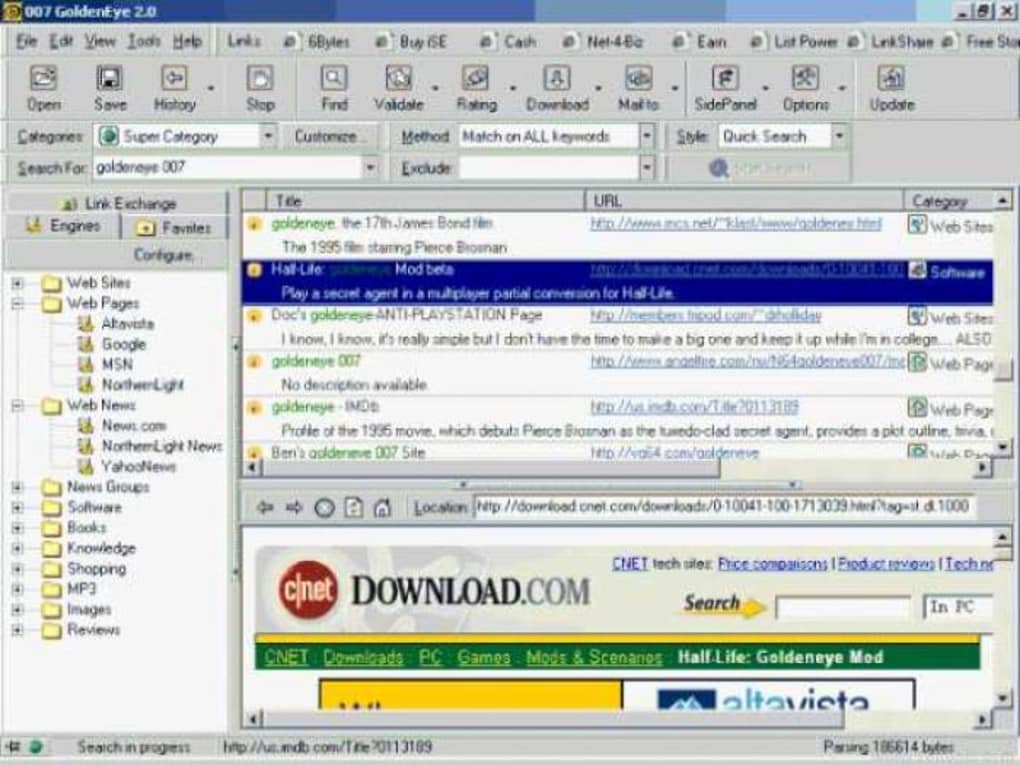
Upon launching 007 GoldenEye for the first time, you will be greeted by a simple toolbar with a single search box. The initial setup wizard asks you to select a default search engine, enable safe‑search, and optionally import bookmarks from Internet Explorer if you are migrating from an older browser. Because the program stores settings in a local config.ini file, you can easily edit preferences manually if you prefer a more hands‑on approach.
Daily Workflow Tips
Using 007 GoldenEye on a daily basis is straightforward. Type your query into the main search bar and press Enter—the results appear within a new window that lists the top ten matches. For power users, keyboard shortcuts such as Ctrl+L (focus the address bar) and Ctrl+R (reload results) speed up navigation. The built‑in cache can be cleared via the Settings menu if you need to free up space or ensure fresh results. Because the browser does not support tabs, each new search opens in a separate window; you can arrange these windows side‑by‑side to compare information quickly. Finally, remember to run the “Check for Updates” utility at least once a month; while the software hasn’t received major updates since 2011, the utility will alert you to any critical security patches released by the developer.
Pros & Cons, Frequently Asked Questions
Pros
- Very low system requirements—runs on machines that struggle with modern browsers.
- Fast search response times thanks to a minimalist engine.
- Portable mode allows use without installation.
- Built‑in safe‑search filter for family‑friendly browsing.
- Free trial version provides full feature access.
Cons
- Limited to legacy Windows operating systems; not compatible with Windows 10/11 without workarounds.
- No support for modern web standards (HTML5, CSS3, JavaScript).
- Trial version may display occasional promotional banners.
- Lacks tabbed browsing and extensions.
- Last major update was in 2011, raising potential security concerns.
FAQ
Is 007 GoldenEye still safe to use in 2025?
While the core engine is simple and has a small attack surface, the lack of recent security patches means it may be vulnerable to newer exploits. Users should restrict its use to trusted networks and avoid entering sensitive data (e.g., passwords or credit‑card numbers) while using the browser.
Can I run 007 GoldenEye on Windows 10?
Officially no, but you can run it in Windows Compatibility Mode (set to Windows 95/98) or inside a virtual machine that emulates an older OS. Performance may vary, and some features like safe‑search might not work as intended.
Does the trial version have any limitations?
The trial version provides full functionality for 30 days. After that period, a non‑intrusive reminder prompts the user to purchase a license, but the application continues to work. No features are locked during the trial.
How does 007 GoldenEye handle privacy?
The browser does not collect telemetry or send usage data to third parties. All search queries are transmitted directly to the selected search engine using standard HTTP/HTTPS requests, and the local cache can be cleared at any time.
Is there a mobile version for Android or iOS?
No. 007 GoldenEye was built exclusively for desktop Windows environments. Users looking for a similar lightweight search experience on mobile devices should consider dedicated apps such as DuckDuckGo or the Lite versions of major browsers.
Overall, 007 GoldenEye shines as a niche solution for legacy Windows machines that need a quick, no‑frills search capability. Its pros—speed, low resource usage, and portable mode—outweigh the cons for the right audience. Users who require modern web features should look elsewhere, but for a pure search tool on older hardware, it still delivers solid value.
Conclusion & Call to Action
If you run an older Windows PC and need a fast, secure way to browse the web without the bloat of modern browsers, 007 GoldenEye remains a viable choice. Its lightweight footprint, simple interface, and free trial make it easy to test before committing to a purchase. Download 007 GoldenEye today to experience a nostalgic yet functional search experience—especially useful for legacy systems, kiosks, or anyone who values speed over flashy features.
Click here to start your download and join the community of users who still trust this classic tool for their everyday searches.
Guides & Tutorials for 007 GoldenEye
How to install 007 GoldenEye
- Click the Preview / Download button above.
- Once redirected, accept the terms and click Install.
- Wait for the 007 GoldenEye download to finish on your device.
How to use 007 GoldenEye
This software is primarily used for its core features described above. Open the app after installation to explore its capabilities.
User Reviews for 007 GoldenEye 0
No reviews found





